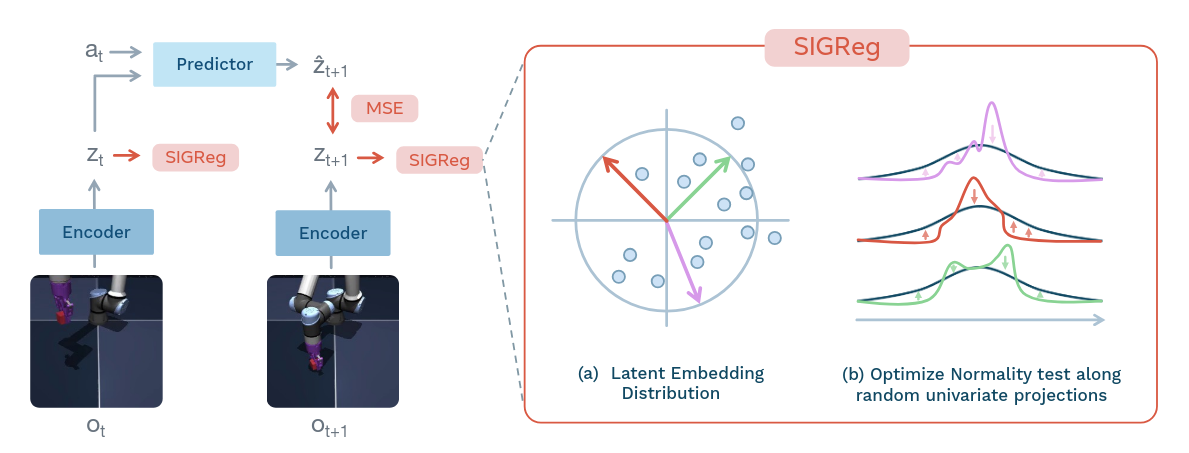
The LeWorldModel training pipeline. Figure from the LeWorldModel paper.
LeWorldModel (LeWM) is a Joint-Embedding Predictive Architecture (JEPA) that learns a world model end to end from pixels. Like other JEPA world models, it predicts future states in latent space and plans there, without reconstructing pixels.
LeWM is the first JEPA that trains stably end to end from pixels with only two loss terms: a prediction loss and a SIGReg loss. SIGReg (Sketched-Isotropic-Gaussian Regularizer) was first proposed in the LeJEPA paper (Balestriero & LeCun, 2025).
The encoder of a JEPA maps each observation (a video frame) to a latent embedding. Without a constraint, the encoder can map every frame to the same vector. Then the predicted embedding always equals the target embedding, so the prediction loss is zero, but the embeddings carry no information about the input. Earlier JEPAs prevent this with other methods, such as an EMA target encoder, stop-gradient, a frozen pretrained encoder, or VICReg-style variance and covariance terms. LeWM prevents representation collapse with SIGReg, therefore LeWM’s loss has only one tunable hyperparameter, the SIGReg weight . PLDM, an earlier end-to-end JEPA, has six.
SIGReg projects the batch of embeddings onto random 1-D directions and computes the Epps–Pulley test statistic for each direction. The Epps–Pulley test calculates the empirical characteristic function of the projected samples. (The characteristic function is the Fourier transform of the distribution of .) It then compares this function with the characteristic function of the standard Gaussian, , by calculating the squared L2 distance between them, weighted by over . SIGReg takes the average over all directions. The SIGReg loss, multiplied by , is added to the prediction loss.
Why project onto random 1-D directions? Testing whether a high-dimensional distribution is an isotropic Gaussian is hard, but the Epps–Pulley test works well in one dimension. By the Cramér–Wold theorem, a distribution is if and only if every 1-D projection of it is . So it is enough to test 1-D projections. Each training step samples 1024 new random directions, so the encoder cannot hide a “bad” direction (a direction where the projected embeddings are not ) for long. The LeJEPA paper shows that sampling a modest number of new directions at each step is enough to prevent collapse in practice.
To make the training pipeline, SIGReg, and planning easier to understand, I asked Claude Code to create four interactive visualizations.
Training Pipeline Visualization
Use the buttons in the visualizer to move from step to step. Each step shows the tensors and their shapes.
Modules with a “+” sign can be expanded. Click the “+” to see inside a module, for example, a ViT block or one of the predictor’s conditional blocks.
SIGReg Characteristic Function Visualization
This visualizer shows the Epps–Pulley test for one 1-D projection. Each sample is put on the unit circle at angle , and the centroid of the points is the empirical characteristic function at . Move the slider, or click Play, to see the centroid follow (or miss) the target . Then choose another distribution, for example “Collapsed”, and see how the SIGReg value grows.
Planning Pipeline Visualization
At test time, LeWM plans with the Cross-Entropy Method (CEM) in latent space. At each planning step, the solver samples 300 candidate action plans from a Gaussian, uses the predictor to roll out each plan in latent space, and scores each plan by the distance between its last predicted embedding and the embedding of the goal image. It keeps the best 30 plans, fits a new Gaussian to them, and repeats this 30 times. The policy then executes the first actions of the mean plan in the environment.
This visualizer shows one planning step on Push-T, with the tensors and their shapes. As in the training visualizer, use the buttons to move from step to step, and click “+” to see inside a module.
Planning Episode Visualization
This visualizer shows real data from one Push-T episode, recorded from a LeWM model that I trained. For each plan, you can see the environment frames, the costs of the candidates at each CEM iteration, and the imagined paths in latent space as the CEM moves toward the goal.